
Everyone keeps telling you AI is going to transform marketing, and you nod along because obviously it will. But then you sit down to actually *do* something with it, and suddenly you're staring at GitHub repos, API documentation, and tutorials that assume you know what a webhook is. It's exhausting. And honestly? It's unnecessary.
I've watched dozens of marketers get paralyzed at this exact moment. They want to use AI agents—those autonomous little helpers that can draft emails, research competitors, or qualify leads while you sleep—but they assume building one requires a computer science degree. Here's what I've learned after coaching teams through this: the technical barrier isn't nearly as high as you think. In fact, you can build a genuinely useful AI agent this afternoon without touching code.
The gap between "I should probably do something with AI" and "I built a thing that actually works" isn't about programming skills. It's about understanding what an agent actually *is* and knowing which no-code tools can get you there. So let me walk you through both.
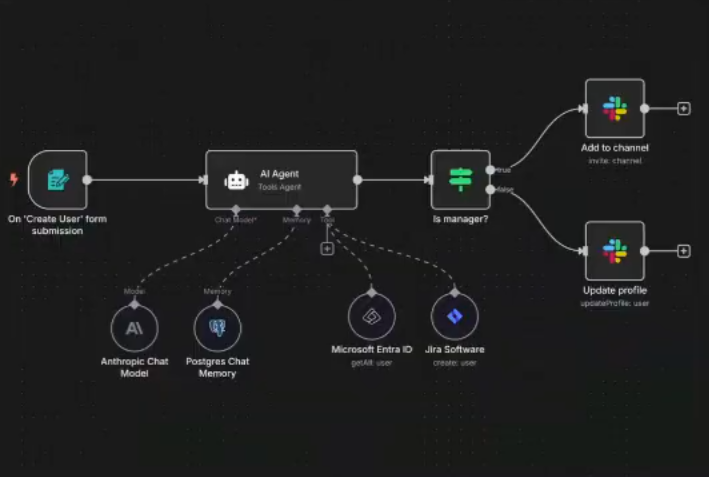
First, let's get clear on what we mean by an AI agent. It's not just ChatGPT in a fancy wrapper. An agent is a system that can perceive its environment, make decisions, and take actions to achieve a goal—without you micromanaging every step. The key word is *autonomy*. You give it an objective and some guardrails, then it figures out the path.
A simple example: imagine an agent that monitors your company's mentions on social media, evaluates whether each mention is a support question or a sales opportunity, and then either drafts a response or creates a ticket in your CRM accordingly. You're not sitting there processing every mention. The agent is perceiving (monitoring social), deciding (categorizing mentions), and acting (creating responses or tickets). That's the loop.
Now here's where most people get stuck—they think building this requires Python scripts and cloud infrastructure. But the no-code ecosystem has matured to the point where you can stitch together surprisingly sophisticated agents using visual interfaces. The trick is knowing which tools to combine.
Start with the brain: you need an LLM that can process information and generate text. The easiest path here is using a platform like Relevance AI, n8n, or Make (formerly Integromat). These are workflow automation tools that have built-in AI capabilities. Think of them as Zapier's smarter cousins—they connect different apps and services, but they also let you embed LLM reasoning into your workflows.
Let me give you a concrete example I built for a client last month. They wanted an agent that could take incoming sales emails, extract key information (company size, pain points, budget signals), score the lead, and then route it to the appropriate sales rep with a briefing document. Total build time: about three hours. Zero code.
Here's how it worked. We used Make as the orchestration layer. First trigger: new email arrives in a specific Gmail inbox. That email gets passed to OpenAI's API (Make has a native integration—you just need to plug in your API key, which takes two minutes). We gave the LLM a prompt that said "Extract the following information from this email: company name, industry, number of employees mentioned, specific pain points discussed, and any budget or timeline indicators. Return as structured JSON."
The LLM processes the email and spits back structured data. Then we used Make's built-in logic tools—just visual if/then blocks—to score the lead. If the company has more than 100 employees and mentioned budget, score is 8+. If they're asking about specific features, add 2 points. You get the idea.
Based on that score, we route to different paths. High-value leads go to the senior sales rep via Slack with a formatted message that includes all the extracted intel. Medium leads get added to a HubSpot sequence. Low-scoring emails get a polite auto-reply suggesting they book time on Calendly. The whole thing runs automatically, 24/7, and processes leads in under 30 seconds.
That's a real AI agent. It's perceiving (monitoring email), deciding (scoring and routing), and acting (messaging reps, updating CRM). And I built it by dragging boxes around on a screen.
The mental shift you need to make is this: you're not a developer building an agent from scratch. You're a conductor orchestrating existing AI capabilities. The LLM gives you the reasoning engine. The automation platform gives you the ability to connect that engine to your actual business tools. Your job is just defining the logic—what should happen when, and under what conditions.
Here's how to start building your first one today. Pick a small, repetitive task that currently requires human judgment. Maybe it's triaging customer support tickets, or summarizing meeting notes, or qualifying inbound demo requests. Something where you're currently reading information, making a decision, and taking an action.
Map out the steps a human takes right now. Be specific. "Read the ticket. Look for keywords indicating it's a billing question. If yes, tag as billing and assign to Sarah. If no, check if it mentions a bug. If yes, create a Jira ticket and link it." That's your logic.
Then pick your no-code platform. If you're already using Zapier, try their AI features. If you want more power, Make or n8n give you more flexibility. Relevance AI is built specifically for this use case and has great templates.
Build your workflow step by step. Connect your trigger (new ticket, new email, new form submission). Add an AI step where you pass the content to an LLM with a clear prompt. Use the platform's logic tools to route based on the LLM's response. Connect your actions (update database, send message, create task).
Test it with real examples. You'll probably need to adjust your prompt a few times—that's normal. LLMs are powerful but they need clear instructions. Be specific about what you want back and in what format.
The first one you build won't be perfect, and that's fine. You're learning a new way of thinking about automation—one where you can embed reasoning and judgment into your workflows, not just rigid if/then rules. That's the unlock.
Want to go deeper? Next week I'm walking through how to give your agents memory and context so they can learn from past interactions. But for now, just build something small. You'll be surprised how quickly "I don't know how to code" stops being a barrier.